目标
本教程将向您展示
- 注意
- 尽管属性可以与组和数据集关联,但 OpenCV 中仅实现了根组的属性。 支持的属性类型为
int、double、cv::String 和 cv::InputArray (仅适用于连续数组)。
源代码
以下代码演示了在根组内读取和写入属性,数据类型为 cv::Mat、cv::String、int 和 double。
您可以从此处下载代码,或在 opencv_contrib 源代码库的 modules/hdf/samples/read_write_attributes.cpp 文件中找到它。
#include <iostream>
static void read_write_attributes()
{
String filename =
"attributes.h5";
String attr_mat_name =
"array attribute";
if (!h5io->atexists(attr_mat_name))
h5io->atwrite(attr_mat, attr_mat_name);
String attr_str_name =
"string attribute";
String attr_str =
"Hello HDF5 from OpenCV!";
if (!h5io->atexists(attr_str_name))
h5io->atwrite(attr_str, attr_str_name);
String attr_int_name =
"int attribute";
int attr_int = 123456;
if (!h5io->atexists(attr_int_name))
h5io->atwrite(attr_int, attr_int_name);
String attr_double_name =
"double attribute";
double attr_double = 45678.123;
if (!h5io->atexists(attr_double_name))
h5io->atwrite(attr_double, attr_double_name);
int expected_attr_int;
double expected_attr_double;
h5io->atread(&expected_attr_str, attr_str_name);
h5io->atread(expected_attr_mat, attr_mat_name);
h5io->atread(&expected_attr_int, attr_int_name);
h5io->atread(&expected_attr_double, attr_double_name);
CV_Assert(attr_str.compare(expected_attr_str) == 0);
CV_Assert(fabs(attr_double - expected_attr_double) < 1e-10);
h5io->close();
}
{
read_write_attributes();
return 0;
}
说明
第一步是打开 HDF5 文件
然后,我们使用 cv::hdf::HDF5::atwrite() 通过指定其值和名称来写入属性
String attr_mat_name =
"array attribute";
if (!h5io->atexists(attr_mat_name))
h5io->atwrite(attr_mat, attr_mat_name);
- 警告
- 在写入属性之前,我们必须使用 cv::hdf::HDF5::atexists() 确保该属性不存在。
要读取属性,我们使用 cv::hdf::HDF5::atread() 并指定属性名称
h5io->atread(expected_attr_mat, attr_mat_name);
最后,我们必须关闭 HDF 文件
结果
图 1 和图 2 给出了使用工具 HDFView 可视化的结果。
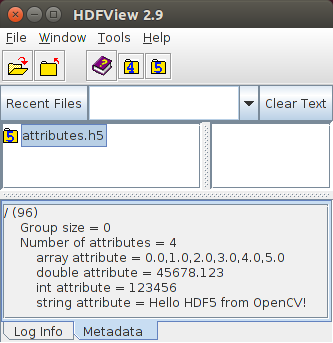
图 1:根组的属性
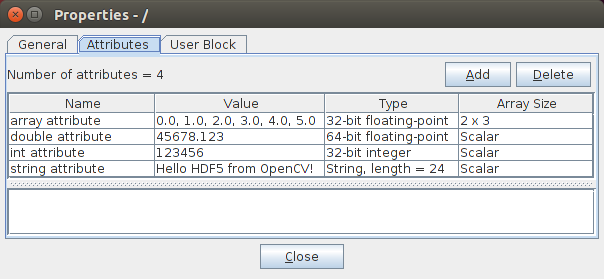
图 2:详细的属性信息

 1.12.0 为 OpenCV 创建