OpenCV 4.12.0
开源计算机视觉
加载中...
搜索中...
无匹配项

分层数据格式版本 5 接口。 更多...

#include <opencv2/hdf/hdf5.hpp>

cv::hdf::HDF5 的协作图

公共类型

枚举  {
  H5_UNLIMITED = -1 ,
  H5_NONE = -1 ,
  H5_GETDIMS = 100 ,
  H5_GETMAXDIMS = 101 ,
  H5_GETCHUNKDIMS = 102
}
 

公共成员函数

virtual ~HDF5 ()
 
virtual void atdelete (const String &atlabel)=0
 
virtual bool atexists (const String &atlabel) const =0
 
virtual void atread (double *value, const String &atlabel)=0
 
virtual void atread (int *value, const String &atlabel)=0
 
virtual void atread (OutputArray value, const String &atlabel)=0
 
virtual void atread (String *value, const String &atlabel)=0
 
virtual void atwrite (const double value, const String &atlabel)=0
 
virtual void atwrite (const int value, const String &atlabel)=0
 
virtual void atwrite (const String &value, const String &atlabel)=0
 
virtual void atwrite (InputArray value, const String &atlabel)=0
 
virtual void close ()=0
 关闭并释放 hdf5 对象。
 
virtual void dscreate (const int n_dims, const int *sizes, const int type, const String &dslabel) const =0
 
virtual void dscreate (const int n_dims, const int *sizes, const int type, const String &dslabel, const int compresslevel) const =0
 
virtual void dscreate (const int n_dims, const int *sizes, const int type, const String &dslabel, const int compresslevel, const int *dims_chunks) const =0
 为 n 维数据集创建并分配存储空间,单通道或多通道类型。
 
virtual void dscreate (const int rows, const int cols, const int type, const String &dslabel) const =0
 
virtual void dscreate (const int rows, const int cols, const int type, const String &dslabel, const int compresslevel) const =0
 
virtual void dscreate (const int rows, const int cols, const int type, const String &dslabel, const int compresslevel, const int *dims_chunks) const =0
 为二维单通道或多通道数据集创建并分配存储空间。
 
virtual void dscreate (const int rows, const int cols, const int type, const String &dslabel, const int compresslevel, const vector< int > &dims_chunks) const =0
 
virtual void dscreate (const vector< int > &sizes, const int type, const String &dslabel, const int compresslevel=HDF5::H5_NONE, const vector< int > &dims_chunks=vector< int >()) const =0
 
virtual vector< int > dsgetsize (const String &dslabel, int dims_flag=HDF5::H5_GETDIMS) const =0
 获取数据集大小。
 
virtual int dsgettype (const String &dslabel) const =0
 获取数据集类型。
 
virtual void dsinsert (InputArray Array, const String &dslabel) const =0
 
virtual void dsinsert (InputArray Array, const String &dslabel, const int *dims_offset) const =0
 
virtual void dsinsert (InputArray Array, const String &dslabel, const int *dims_offset, const int *dims_counts) const =0
 Mat 对象插入或覆盖到指定数据集,如果无限制属性允许则自动扩展数据集大小。
 
virtual void dsinsert (InputArray Array, const String &dslabel, const vector< int > &dims_offset, const vector< int > &dims_counts=vector< int >()) const =0
 
virtual void dsread (OutputArray Array, const String &dslabel) const =0
 
virtual void dsread (OutputArray Array, const String &dslabel, const int *dims_offset) const =0
 
virtual void dsread (OutputArray Array, const String &dslabel, const int *dims_offset, const int *dims_counts) const =0
 从 hdf5 文件读取指定数据集到 Mat 对象。
 
virtual void dsread (OutputArray Array, const String &dslabel, const vector< int > &dims_offset, const vector< int > &dims_counts=vector< int >()) const =0
 
virtual void dswrite (InputArray Array, const String &dslabel) const =0
 
virtual void dswrite (InputArray Array, const String &dslabel, const int *dims_offset) const =0
 
virtual void dswrite (InputArray Array, const String &dslabel, const int *dims_offset, const int *dims_counts) const =0
 Mat 对象写入或覆盖到 hdf5 文件的指定数据集。
 
virtual void dswrite (InputArray Array, const String &dslabel, const vector< int > &dims_offset, const vector< int > &dims_counts=vector< int >()) const =0
 
virtual void grcreate (const String &grlabel)=0
 创建一个组。
 
virtual bool hlexists (const String &label) const =0
 检查标签是否存在。
 
virtual void kpcreate (const int size, const String &kplabel, const int compresslevel=H5_NONE, const int chunks=H5_NONE) const =0
 cv::KeyPoint 数据集创建并分配特殊存储空间。
 
virtual int kpgetsize (const String &kplabel, int dims_flag=HDF5::H5_GETDIMS) const =0
 获取关键点数据集大小。
 
virtual void kpinsert (const vector< KeyPoint > keypoints, const String &kplabel, const int offset=H5_NONE, const int counts=H5_NONE) const =0
 KeyPoint 列表插入或覆盖到指定数据集,如果无限制属性允许则自动扩展数据集大小。
 
virtual void kpread (vector< KeyPoint > &keypoints, const String &kplabel, const int offset=H5_NONE, const int counts=H5_NONE) const =0
 从 hdf5 文件读取指定关键点数据集到 vector<KeyPoint> 对象。
 
virtual void kpwrite (const vector< KeyPoint > keypoints, const String &kplabel, const int offset=H5_NONE, const int counts=H5_NONE) const =0
 KeyPoint 列表写入或覆盖到 hdf5 文件的指定数据集。
 

详细描述

分层数据格式版本 5 接口。

请注意,此模块仅在 hdf5 正确安装时才编译。

成员枚举文档

◆ 匿名枚举

匿名枚举
枚举器
H5_UNLIMITED 

维度大小是无限制的。

另请参见
dscreate()
H5_NONE 

无压缩。

另请参见
dscreate()
H5_GETDIMS 

获取数据集的维度信息。

另请参见
dsgetsize()
H5_GETMAXDIMS 

获取数据集的最大维度信息。

另请参见
dsgetsize()
H5_GETCHUNKDIMS 

获取数据集的块大小。

另请参见
dsgetsize()

构造函数 & 析构函数文档

◆ ~HDF5()

virtual cv::hdf::HDF5::~HDF5 ( )
内联虚函数

成员函数文档

◆ atdelete()

virtual void cv::hdf::HDF5::atdelete ( const String & atlabel)
纯虚函数

从根组中删除一个属性。

参数
atlabel要删除的属性。
注意
如果给定的属性不存在,则会调用 CV_Error()。请事先使用 atexists() 检查它是否存在。
另请参见
atexists, atwrite, atread

◆ atexists()

virtual bool cv::hdf::HDF5::atexists ( const String & atlabel) const
纯虚函数

检查根组中给定的属性是否存在。

参数
atlabel要检查的属性名称。
返回
如果属性存在则为 true,否则为 false。
另请参见
atdelete, atwrite, atread

◆ atread() [1/4]

virtual void cv::hdf::HDF5::atread ( 如果传入NULL,则假定尺度参数c为1.0。否则,指向的变量将被设置为最优尺度。 ,
const String & atlabel )
纯虚函数

这是一个重载的成员函数,为方便起见提供。它与上面的函数仅在接受的参数上不同。

◆ atread() [2/4]

virtual void cv::hdf::HDF5::atread ( int * ,
const String & atlabel )
纯虚函数

从根组读取一个属性。

参数
读取属性的地址。
atlabel属性名称。

以下示例演示如何读取 cv::String 类型的属性

String expected_attr_str;
h5io->atread(&expected_attr_str, attr_str_name);
注意
属性必须存在,否则将调用 CV_Error()。请事先使用 atexists() 检查它是否存在。
另请参见
atexists, atdelete, atwrite

◆ atread() [3/4]

virtual void cv::hdf::HDF5::atread ( OutputArray ,
const String & atlabel )
纯虚函数

从根组读取一个属性。

参数
属性值。目前,仅支持 N 维连续多通道数组。
atlabel属性名称。
注意
属性必须存在,否则将调用 CV_Error()。请事先使用 atexists() 检查它是否存在。
另请参见
atexists, atdelete, atwrite

◆ atread() [4/4]

virtual void cv::hdf::HDF5::atread ( String * ,
const String & atlabel )
纯虚函数

这是一个重载的成员函数,为方便起见提供。它与上面的函数仅在接受的参数上不同。

◆ atwrite() [1/4]

virtual void cv::hdf::HDF5::atwrite ( const double ,
const String & atlabel )
纯虚函数

这是一个重载的成员函数,为方便起见提供。它与上面的函数仅在接受的参数上不同。

◆ atwrite() [2/4]

virtual void cv::hdf::HDF5::atwrite ( const int ,
const String & atlabel )
纯虚函数

在根组中写入一个属性。

参数
属性值。
atlabel属性名称。

以下示例演示如何写入 cv::String 类型的属性

String attr_str_name = "string attribute";
String attr_str = "Hello HDF5 from OpenCV!";
if (!h5io->atexists(attr_str_name))
h5io->atwrite(attr_str, attr_str_name);
注意
如果给定的属性已存在,则会调用 CV_Error()。请事先使用 atexists() 检查它是否存在。如果它已经存在,则使用 atdelete() 将其删除。
另请参见
atexists, atdelete, atread

◆ atwrite() [3/4]

virtual void cv::hdf::HDF5::atwrite ( const String & ,
const String & atlabel )
纯虚函数

这是一个重载的成员函数,为方便起见提供。它与上面的函数仅在接受的参数上不同。

◆ atwrite() [4/4]

virtual void cv::hdf::HDF5::atwrite ( InputArray ,
const String & atlabel )
纯虚函数

将属性写入根组。

参数
属性值。目前,仅支持 N 维连续多通道数组。
atlabel属性名称。
注意
如果给定的属性已存在,则会调用 CV_Error()。请事先使用 atexists() 检查它是否存在。如果它已经存在,则使用 atdelete() 将其删除。
另请参见
atexists, atdelete, atread

◆ close()

virtual void cv::hdf::HDF5::close ( )
纯虚函数

关闭并释放 hdf5 对象。

◆ dscreate() [1/8]

virtual void cv::hdf::HDF5::dscreate ( const int n_dims,
const int * sizes,
const int type,
const String & dslabel ) const
纯虚函数

◆ dscreate() [2/8]

virtual void cv::hdf::HDF5::dscreate ( const int n_dims,
const int * sizes,
const int type,
const String & dslabel,
const int compresslevel ) const
纯虚函数

◆ dscreate() [3/8]

virtual void cv::hdf::HDF5::dscreate ( const int n_dims,
const int * sizes,
const int type,
const String & dslabel,
const int compresslevel,
const int * dims_chunks ) const
纯虚函数

为 n 维数据集创建并分配存储空间,单通道或多通道类型。

参数
n_dims声明维度数量
sizes包含每个维度大小的数组
type要使用的类型,例如 CV_8UC3, CV_32FC1 等。
dslabel指定 hdf5 数据集标签。如果数据集标签已存在将导致错误。
compresslevel指定要使用的压缩级别 0-9,H5_NONE 是默认值,表示不压缩。值 0 也表示不压缩。值 9 表示最佳压缩比。请注意,更高的压缩级别意味着更高的计算成本。它依赖 GNU gzip 进行压缩。
dims_chunks每个数组成员指定用于块 I/O 的分块大小,默认 NULL 表示完全没有。
注意
如果数据集已存在,将抛出异常。可以使用 hlexists() 检查数据集是否存在。
  • 请看下面的示例,它创建了一个 6 维存储空间
    // 打开/自动创建 hdf5 文件
    cv::Ptr<cv::hdf::HDF5> h5io = cv::hdf::open( "mytest.h5" );
    // 为 6 维 CV_64FC2 矩阵创建空间
    if ( ! h5io->hlexists( "nddata" ) )
    int n_dims = 5;
    int dsdims[n_dims] = { 100, 100, 20, 10, 5, 5 };
    h5io->dscreate( n_dims, sizes, CV_64FC2, "nddata" );
    else
    printf("DS 已经创建,跳过\n" );
    // 释放
    h5io->close();
    std::shared_ptr< _Tp > Ptr
    Definition cvstd_wrapper.hpp:23
    CV_64FC2
    #define CV_64FC2
    Ptr< HDF5 > open(const String &HDF5Filename)
    打开或创建 hdf5 文件。
注意
激活压缩需要内部分块。分块可以显著提高读写访问速度,特别是对于在数据集内部偏移的窗口访问逻辑。如果没有指定自定义分块,则默认的分块将数据集整体作为一个大的数据块来调用。
  • 请看级别 0 压缩(浅层)使用第一维度分块的示例,这样存储将由 100 个数据块组成
    // 打开/自动创建 hdf5 文件
    cv::Ptr<cv::hdf::HDF5> h5io = cv::hdf::open( "mytest.h5" );
    // 为 6 维 CV_64FC2 矩阵创建空间
    if ( ! h5io->hlexists( "nddata" ) )
    int n_dims = 5;
    int dsdims[n_dims] = { 100, 100, 20, 10, 5, 5 };
    int chunks[n_dims] = { 1, 100, 20, 10, 5, 5 };
    h5io->dscreate( n_dims, dsdims, CV_64FC2, "nddata", 0, chunks );
    else
    printf("DS 已经创建,跳过\n" );
    // 释放
    h5io->close();
注意
sizes 数组中使用 H5_UNLIMITED 值表示该维度的数据是无限制的,因此可以在这些无限制方向上随时扩展此类数据集。任何维度上存在 H5_UNLIMITED 都要求定义自定义分块。在无限制场景中不会定义默认分块,因为该维度上的默认大小将为零,并且在写入数据集后会增长。写入具有 H5_UNLIMITED 的数据集需要 dsinsert() 而不是 dswrite(),因为它允许在无限制维度上增长,而 dswrite() 仅允许在预定义的数据空间中写入。

◆ dscreate() [4/8]

virtual void cv::hdf::HDF5::dscreate ( const int rows,
const int cols,
const int type,
const String & dslabel ) const
纯虚函数

这是一个重载的成员函数,为方便起见提供。它与上面的函数仅在接受的参数上不同。

◆ dscreate() [5/8]

virtual void cv::hdf::HDF5::dscreate ( const int rows,
const int cols,
const int type,
const String & dslabel,
const int compresslevel ) const
纯虚函数

这是一个重载的成员函数,为方便起见提供。它与上面的函数仅在接受的参数上不同。

◆ dscreate() [6/8]

virtual void cv::hdf::HDF5::dscreate ( const int rows,
const int cols,
const int type,
const String & dslabel,
const int compresslevel,
const int * dims_chunks ) const
纯虚函数

为二维单通道或多通道数据集创建并分配存储空间。

参数
rows声明行数
cols声明列数
type要使用的类型,例如 CV_8UC3、CV_32FC1 等。
dslabel指定 hdf5 数据集标签。如果数据集标签已存在将导致错误。
compresslevel指定要使用的压缩级别 0-9,H5_NONE 是默认值,表示不压缩。值 0 也表示不压缩。值 9 表示最佳压缩比。请注意,更高的压缩级别意味着更高的计算成本。它依赖 GNU gzip 进行压缩。
dims_chunks每个数组成员指定用于块 I/O 的分块大小,默认 NULL 表示完全没有。
注意
如果数据集已存在,将抛出异常(调用 CV_Error())。
  • 可以使用 hlexists() 检查数据集是否存在,示例如下
    // 打开/自动创建 hdf5 文件
    cv::Ptr<cv::hdf::HDF5> h5io = cv::hdf::open( "mytest.h5" );
    // 为 100x50 CV_64FC2 矩阵创建空间
    if ( ! h5io->hlexists( "hilbert" ) )
    h5io->dscreate( 100, 50, CV_64FC2, "hilbert" );
    else
    printf("DS 已经创建,跳过\n" );
    // 释放
    h5io->close();
注意
激活压缩需要内部分块。分块可以显著提高读写访问速度,特别是对于在数据集内部偏移的窗口访问逻辑。如果没有指定自定义分块,则默认的分块将数据集整体作为一个大的数据块来调用。
  • 请看级别 9 压缩使用内部默认分块的示例
    // 打开/自动创建 hdf5 文件
    cv::Ptr<cv::hdf::HDF5> h5io = cv::hdf::open( "mytest.h5" );
    // 为 CV_64FC2 矩阵创建级别 9 压缩空间
    if ( ! h5io->hlexists( "hilbert", 9 ) )
    h5io->dscreate( 100, 50, CV_64FC2, "hilbert", 9 );
    else
    printf("DS 已经创建,跳过\n" );
    // 释放
    h5io->close();
注意
rowscols 或两者都使用 H5_UNLIMITED 值表示指定维度上的数据是无限制的,因此可以随时在行、列或两个方向上扩展此类数据集。任何维度上存在 H5_UNLIMITED 都要求定义自定义分块。在无限制场景中不会定义默认分块,因为该维度上的默认大小将为零,并且在写入数据集后会增长。写入具有 H5_UNLIMITED 的数据集需要 dsinsert(),它允许在无限制维度上增长,而不是 dswrite(),它仅允许在预定义的数据空间中写入。
注意
不是线程安全的,必须在数据集创建时只调用一次,否则会发生异常。单个 hdf5 文件中允许多个数据集。

◆ dscreate() [7/8]

virtual void cv::hdf::HDF5::dscreate ( const int rows,
const int cols,
const int type,
const String & dslabel,
const int compresslevel,
const vector< int > & dims_chunks ) const
纯虚函数

这是一个重载的成员函数,为方便起见提供。它与上面的函数仅在接受的参数上不同。

◆ dscreate() [8/8]

virtual void cv::hdf::HDF5::dscreate ( const vector< int > & sizes,
const int type,
const String & dslabel,
const int compresslevel = HDF5::H5_NONE,
const vector< int > & dims_chunks = vector< int >() ) const
纯虚函数

◆ dsgetsize()

virtual vector< int > cv::hdf::HDF5::dsgetsize ( const String & dslabel,
int dims_flag = HDF5::H5_GETDIMS ) const
纯虚函数

获取数据集大小。

参数
dslabel指定要测量尺寸的 hdf5 数据集标签。
dims_flag将获取数据集在 H5_GETDIMS 上的维度,在 H5_GETMAXDIMS 上的数据集最大维度,以及在 H5_GETCHUNKDIMS 上的分块大小。

返回包含数据集在每个维度上的大小的向量对象。

注意
结果向量大小将与数据集的维度数量匹配。默认情况下,H5_GETDIMS 将返回实际数据集维度。使用 H5_GETMAXDIM 标志将获取最大允许维度,该维度通常与实际数据集维度匹配,但如果数据集在某些维度上以无限制模式准备,则可以包含 H5_UNLIMITED 值。在完全或部分覆盖现有数据集之前检查其维度可能很有用。尝试用过大的源数据写入数据集目标将抛出异常。H5_GETCHUNKDIMS 将返回分块的维度(如果数据集是使用分块选项创建的),否则返回的向量大小将为零。

◆ dsgettype()

virtual int cv::hdf::HDF5::dsgettype ( const String & dslabel) const
纯虚函数

获取数据集类型。

参数
dslabel指定要检查的 hdf5 数据集标签。

返回存储的矩阵类型。这是一个与 CvMat 类型系统兼容的标识符,例如 CV_16SC5(16 位有符号 5 通道数组)等。

注意
结果可以通过 CV_MAT_CN() 解析以获取通道数量,并通过 CV_MAT_DEPTH() 解析以获取原生 cvdata 类型。它是线程安全的。

◆ dsinsert() [1/4]

virtual void cv::hdf::HDF5::dsinsert ( InputArray Array,
const String & dslabel ) const
纯虚函数

◆ dsinsert() [2/4]

virtual void cv::hdf::HDF5::dsinsert ( InputArray Array,
const String & dslabel,
const int * dims_offset ) const
纯虚函数

◆ dsinsert() [3/4]

virtual void cv::hdf::HDF5::dsinsert ( InputArray Array,
const String & dslabel,
const int * dims_offset,
const int * dims_counts ) const
纯虚函数

Mat 对象插入或覆盖到指定数据集,如果无限制属性允许则自动扩展数据集大小。

参数
Array指定要写入的 Mat 数据数组。
dslabel指定目标 hdf5 数据集标签。
dims_offset每个数组成员指定数据集的每个维度上的偏移位置,InputArray 将从该位置写入(覆盖)到数据集中。
dims_counts每个数组成员指定 InputArray 在数据集的每个维度上将写入数据集的数据量。

Mat 对象写入目标数据集并自动扩展数据集维度(如果允许)。

注意
dswrite() 不同,数据集不会自动创建。只支持 Mat 并且它必须是连续的。如果 dsinsert() 发生在数据集维度的外部区域并且数据集在该维度上处于无限制模式,则数据集会扩展,否则会抛出异常。要创建在特定或更多维度上具有无限制属性的数据集,请参阅 dscreate() 和创建时的可选 H5_UNLIMITED 标志。它在同一个数据集上不是线程安全的,但多个数据集可以合并到单个 hdf5 文件中。
  • 下面的示例创建了无限制行 x 100 列,并使用单个 100x100 CV_64FC2 在数据集上通过 dsinsert() 扩展行 5 次。最终大小将有 5x100 行和 100 列,反映 H 矩阵在行跨度上的五倍。分块大小为 100x100,仅针对禁用压缩的 H 矩阵大小进行了优化。如果例程被多次调用,数据集将被覆盖。
    // 双通道希尔伯特矩阵
    cv::Mat H(50, 100, CV_64FC2);
    for(int i = 0; i < H.rows; i++)
    for(int j = 0; j < H.cols; j++)
    {
    H.at<cv::Vec2d>(i,j)[0] = 1./(i+j+1);
    H.at<cv::Vec2d>(i,j)[1] = -1./(i+j+1);
    count++;
    }
    // 打开/自动创建 hdf5 文件
    cv::Ptr<cv::hdf::HDF5> h5io = cv::hdf::open( "mytest.h5" );
    // 按块优化数据集
    int chunks[2] = { 100, 100 };
    // 创建无限制 x 100 CV_64FC2 空间
    h5io->dscreate( cv::hdf::HDF5::H5_UNLIMITED, 100, CV_64FC2, "hilbert", cv::hdf::HDF5::H5_NONE, chunks );
    // 写入前半部分
    int offset[2] = { 0, 0 };
    for ( int t = 0; t < 5; t++ )
    {
    offset[0] += 100 * t;
    h5io->dsinsert( H, "hilbert", offset );
    }
    // 释放
    h5io->close();
    n 维密集数组类
    定义 mat.hpp:830

◆ dsinsert() [4/4]

virtual void cv::hdf::HDF5::dsinsert ( InputArray Array,
const String & dslabel,
const vector< int > & dims_offset,
const vector< int > & dims_counts = vector< int >() ) const
纯虚函数

◆ dsread() [1/4]

virtual void cv::hdf::HDF5::dsread ( OutputArray Array,
const String & dslabel ) const
纯虚函数

◆ dsread() [2/4]

virtual void cv::hdf::HDF5::dsread ( OutputArray Array,
const String & dslabel,
const int * dims_offset ) const
纯虚函数

◆ dsread() [3/4]

virtual void cv::hdf::HDF5::dsread ( OutputArray Array,
const String & dslabel,
const int * dims_offset,
const int * dims_counts ) const
纯虚函数

从 hdf5 文件读取指定数据集到 Mat 对象。

参数
ArrayMat 容器,数据读取结果将返回到其中。
dslabel指定源 hdf5 数据集标签。
dims_offset每个数组成员指定数据集的每个维度上的偏移位置,从该位置开始读取到 OutputArray 中。
dims_counts每个数组成员指定数据集的每个维度上要读取到 OutputArray 中的数据量。

读出反映存储数据集的 Mat 对象。

注意
如果 hdf5 文件不存在,将抛出异常。使用 hlexists() 检查数据集是否存在。它是线程安全的。
  • 下面的示例读取一个数据集
    // 打开 hdf5 文件
    cv::Ptr<cv::hdf::HDF5> h5io = cv::hdf::open( "mytest.h5" );
    // 空的 Mat 容器
    // 读取 hibert 数据集
    h5io->read( H, "hilbert" );
    // 释放
    h5io->close();
  • 下面的示例从第二行和第三个元素开始读取 3x5 子矩阵。
    // 打开 hdf5 文件
    cv::Ptr<cv::hdf::HDF5> h5io = cv::hdf::open( "mytest.h5" );
    // 空的 Mat 容器
    int offset[2] = { 1, 2 };
    int counts[2] = { 3, 5 };
    // 读取 hibert 数据集
    h5io->read( H, "hilbert", offset, counts );
    // 释放
    h5io->close();

◆ dsread() [4/4]

virtual void cv::hdf::HDF5::dsread ( OutputArray Array,
const String & dslabel,
const vector< int > & dims_offset,
const vector< int > & dims_counts = vector< int >() ) const
纯虚函数

◆ dswrite() [1/4]

virtual void cv::hdf::HDF5::dswrite ( InputArray Array,
const String & dslabel ) const
纯虚函数

◆ dswrite() [2/4]

virtual void cv::hdf::HDF5::dswrite ( InputArray Array,
const String & dslabel,
const int * dims_offset ) const
纯虚函数

◆ dswrite() [3/4]

virtual void cv::hdf::HDF5::dswrite ( InputArray Array,
const String & dslabel,
const int * dims_offset,
const int * dims_counts ) const
纯虚函数

Mat 对象写入或覆盖到 hdf5 文件的指定数据集。

参数
Array指定要写入的 Mat 数据数组。
dslabel指定目标 hdf5 数据集标签。
dims_offset每个数组成员指定数据集的每个维度上的偏移位置,InputArray 将从该位置写入(覆盖)到数据集中。
dims_counts每个数组成员指定 InputArray 在数据集的每个维度上将写入数据集的数据量。

Mat 对象写入目标数据集。

注意
如果数据集未创建且不存在,则将自动创建。只支持 Mat 并且它必须是连续的。它是线程安全的,但建议写入操作发生在不重叠的独立区域。多个数据集可以写入单个 hdf5 文件中。
  • 下面的示例将一个 100x100 CV_64FC2 矩阵写入数据集。不需要预先创建数据集。如果例程被多次调用,数据集将被覆盖。
    // 双通道希尔伯特矩阵
    cv::Mat H(100, 100, CV_64FC2);
    for(int i = 0; i < H.rows; i++)
    for(int j = 0; j < H.cols; j++)
    {
    H.at<cv::Vec2d>(i,j)[0] = 1./(i+j+1);
    H.at<cv::Vec2d>(i,j)[1] = -1./(i+j+1);
    count++;
    }
    // 打开/自动创建 hdf5 文件
    cv::Ptr<cv::hdf::HDF5> h5io = cv::hdf::open( "mytest.h5" );
    // 写入/覆盖数据集
    h5io->dswrite( H, "hilbert" );
    // 释放
    h5io->close();
  • 下面的示例将一个较小的 50x100 矩阵写入 100x100 压缩空间,该空间由两个 50x100 的块优化。矩阵使用偏移量写入数据空间的前半部分 (0->50) 和后半部分 (50->100) 两次。如果例程被多次调用,数据集将被覆盖。
    // 双通道希尔伯特矩阵
    cv::Mat H(50, 100, CV_64FC2);
    for(int i = 0; i < H.rows; i++)
    for(int j = 0; j < H.cols; j++)
    {
    H.at<cv::Vec2d>(i,j)[0] = 1./(i+j+1);
    H.at<cv::Vec2d>(i,j)[1] = -1./(i+j+1);
    count++;
    }
    // 打开/自动创建 hdf5 文件
    cv::Ptr<cv::hdf::HDF5> h5io = cv::hdf::open( "mytest.h5" );
    // 通过两个块优化数据集
    int chunks[2] = { 50, 100 };
    // 创建 100x100 CV_64FC2 压缩空间
    h5io->dscreate( 100, 100, CV_64FC2, "hilbert", 9, chunks );
    // 写入前半部分
    int offset1[2] = { 0, 0 };
    h5io->dswrite( H, "hilbert", offset1 );
    // 写入后半部分
    int offset2[2] = { 50, 0 };
    h5io->dswrite( H, "hilbert", offset2 );
    // 释放
    h5io->close();

◆ dswrite() [4/4]

virtual void cv::hdf::HDF5::dswrite ( InputArray Array,
const String & dslabel,
const vector< int > & dims_offset,
const vector< int > & dims_counts = vector< int >() ) const
纯虚函数

◆ grcreate()

virtual void cv::hdf::HDF5::grcreate ( const String & grlabel)
纯虚函数

创建一个组。

参数
grlabel指定 hdf5 组标签。

创建具有默认属性的 hdf5 组。组在创建后自动关闭。

注意
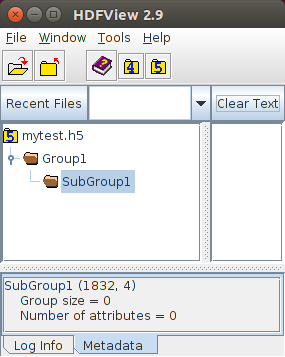
组对于更好地组织多个数据集很有用。可以在任何组中创建子组。可以使用 hlexists() 检查特定组是否存在。对于子组,标签将是例如:“Group1/SubGroup1”,其中 SubGroup1 在根组 Group1 内部。在创建子组之前,必须创建其父组。
  • 在此示例中,Group1 将有一个名为 SubGroup1 的子组

    Ptr<hdf::HDF5> h5io = hdf::open("mytest.h5");
    // "/" 表示根组,它始终存在
    if (!h5io->hlexists("/Group1"))
    h5io->grcreate("/Group1");
    else
    std::cout << "/Group1 已经创建,跳过。\n";
    // 请注意,Group1 已在上面创建,否则会发生异常
    if (!h5io->hlexists("/Group1/SubGroup1"))
    h5io->grcreate("/Group1/SubGroup1");
    else
    std::cout << "/Group1/SubGroup1 已经创建,跳过。\n";
    h5io->close();

    使用 HDFView 工具可视化的相应结果是

使用 HDFView 工具可视化组
注意
当使用 dscreate()kpcreate() 创建数据集时,可以通过在标签中指定完整路径在组内创建它。在我们的示例中,它将是:“Group1/SubGroup1/MyDataSet”。它不是线程安全的。

◆ hlexists()

virtual bool cv::hdf::HDF5::hlexists ( const String & label) const
纯虚函数

检查标签是否存在。

参数
label指定 hdf5 数据集标签。

如果数据集存在,返回true,否则返回false

注意
检查数据集、组或其他对象类型(hdf5 链接)是否存在于标签名称下。它是线程安全的。

◆ kpcreate()

virtual void cv::hdf::HDF5::kpcreate ( const int size,
const String & kplabel,
const int compresslevel = H5_NONE,
const int chunks = H5_NONE ) const
纯虚函数

cv::KeyPoint 数据集创建并分配特殊存储空间。

参数
size声明固定数量的关键点
kplabel指定 hdf5 数据集标签,任何具有相同标签的现有数据集都将被覆盖。
compresslevel指定要使用的压缩级别 0-9,H5_NONE 是默认值,表示不压缩。
chunks每个数组成员指定用于块 I/O 的分块大小,H5_NONE 是默认值,表示不压缩。
注意
如果数据集已存在,将抛出异常。可以使用 hlexists() 检查数据集是否存在。
  • 请看下面的示例,它在数据集中为 100 个关键点创建空间
    // 打开 hdf5 文件
    cv::Ptr<cv::hdf::HDF5> h5io = cv::hdf::open( "mytest.h5" );
    if ( ! h5io->hlexists( "keypoints" ) )
    h5io->kpcreate( 100, "keypoints" );
    else
    printf("DS 已经创建,跳过\n" );
注意
size 参数的 H5_UNLIMITED 值表示无限制的关键点数量,因此可以通过添加或插入随时扩展此类数据集。H5_UNLIMITED 的存在要求定义自定义分块。在无限制场景中不会定义默认分块,因为该维度上的默认大小将为零,并且在写入数据集后会增长。写入具有 H5_UNLIMITED 的数据集需要 kpinsert(),它允许在无限制维度上增长,而不是 kpwrite(),它仅允许在预定义数据空间中写入。

◆ kpgetsize()

virtual int cv::hdf::HDF5::kpgetsize ( const String & kplabel,
int dims_flag = HDF5::H5_GETDIMS ) const
纯虚函数

获取关键点数据集大小。

参数
kplabel指定要测量尺寸的 hdf5 数据集标签。
dims_flag将获取数据集在 H5_GETDIMS 上的维度,以及在 H5_GETMAXDIMS 上的数据集最大维度。

返回关键点数据集的大小。

注意
结果大小将与关键点数量匹配。默认情况下,H5_GETDIMS 将返回实际数据集维度。使用 H5_GETMAXDIM 标志将获取最大允许维度,该维度通常与实际数据集维度匹配,但如果数据集以无限制模式准备,则可以包含 H5_UNLIMITED 值。在完全或部分覆盖现有数据集之前检查其维度可能很有用。尝试用过大的源数据写入数据集目标将抛出异常。H5_GETCHUNKDIMS 将返回分块的维度(如果数据集是使用分块选项创建的),否则返回的向量大小将为零。

◆ kpinsert()

virtual void cv::hdf::HDF5::kpinsert ( const vector< KeyPoint > keypoints,
const String & kplabel,
const int offset = H5_NONE,
const int counts = H5_NONE ) const
纯虚函数

KeyPoint 列表插入或覆盖到指定数据集,如果无限制属性允许则自动扩展数据集大小。

参数
keypoints指定要写入的关键点数据列表。
kplabel指定目标 hdf5 数据集标签。
offset指定数据集上偏移位置,关键点将从该位置写入(覆盖)到数据集中。
counts指定将写入数据集的关键点数量。

将 vector<KeyPoint> 对象写入目标数据集并自动扩展数据集维度(如果允许)。

注意
kpwrite() 不同,数据集不会自动创建。如果 dsinsert() 发生在数据集的外部区域,并且数据集已以无限制模式创建,则数据集会扩展,否则将抛出异常。要创建具有无限制属性的数据集,请参阅 kpcreate() 和创建时可选的 H5_UNLIMITED 标志。它在同一数据集上不是线程安全的,但多个数据集可以合并到单个 hdf5 文件中。
  • 下面的示例创建了用于关键点存储的无限制空间,并将 10 个关键点列表插入该空间十次。最终数据集将包含 100 个关键点。分块大小为 10,仅针对关键点列表进行了优化。如果例程被多次调用,数据集将被覆盖。
    // 生成 10 个虚拟关键点
    std::vector<cv::KeyPoint> keypoints;
    for(int i = 0; i < 10; i++)
    keypoints.push_back( cv::KeyPoint(i, -i, 1, -1, 0, 0, -1) );
    // 打开/自动创建 hdf5 文件
    cv::Ptr<cv::hdf::HDF5> h5io = cv::hdf::open( "mytest.h5" );
    // 创建无限制大小空间,分块大小为 10
    h5io->kpcreate( cv::hdf::HDF5::H5_UNLIMITED, "keypoints", -1, 10 );
    // 插入 10 次相同的 10 个关键点
    for(int i = 0; i < 10; i++)
    h5io->kpinsert( keypoints, "keypoints", i * 10 );
    // 释放
    h5io->close();
    用于显著点检测器的数据结构。
    定义于 types.hpp:752

◆ kpread()

virtual void cv::hdf::HDF5::kpread ( vector< KeyPoint > & keypoints,
const String & kplabel,
const int offset = H5_NONE,
const int counts = H5_NONE ) const
纯虚函数

从 hdf5 文件读取指定关键点数据集到 vector<KeyPoint> 对象。

参数
keypointsvector<KeyPoint> 容器,数据读取结果将返回到其中。
kplabel指定源 hdf5 数据集标签。
offset指定数据集上读取开始的偏移位置。
counts指定从数据集中读取的关键点数量。

读出反映存储数据集的 vector<KeyPoint> 对象。

注意
如果 hdf5 文件不存在,将抛出异常。使用 hlexists() 检查数据集是否存在。它是线程安全的。
  • 下面的示例读取一个包含关键点的数据集,从第二个条目开始
    // 打开 hdf5 文件
    cv::Ptr<cv::hdf::HDF5> h5io = cv::hdf::open( "mytest.h5" );
    // 空的关键点容器
    std::vector<cv::KeyPoint> keypoints;
    // 从第二个关键点开始读取
    h5io->kpread( keypoints, "keypoints", 1 );
    // 释放
    h5io->close();
  • 下面的示例从第二个条目开始读取 3 个关键点。
    // 打开 hdf5 文件
    cv::Ptr<cv::hdf::HDF5> h5io = cv::hdf::open( "mytest.h5" );
    // 空的关键点容器
    std::vector<cv::KeyPoint> keypoints;
    // 从第二个关键点开始读取三个关键点
    h5io->kpread( keypoints, "keypoints", 1, 3 );
    // 释放
    h5io->close();

◆ kpwrite()

virtual void cv::hdf::HDF5::kpwrite ( const vector< KeyPoint > keypoints,
const String & kplabel,
const int offset = H5_NONE,
const int counts = H5_NONE ) const
纯虚函数

KeyPoint 列表写入或覆盖到 hdf5 文件的指定数据集。

参数
keypoints指定要写入的关键点数据列表。
kplabel指定目标 hdf5 数据集标签。
offset指定数据集上偏移位置,关键点将从该位置写入(覆盖)到数据集中。
counts指定将写入数据集的关键点数量。

将 vector<KeyPoint> 对象写入目标数据集。

注意
如果数据集未创建且不存在,则将自动创建。它是线程安全的,但建议写入操作发生在不重叠的独立区域。多个数据集可以写入单个 hdf5 文件中。
  • 下面的示例将 100 个关键点写入数据集。不需要预先创建数据集。如果例程被多次调用,数据集将被覆盖。
    // 生成 100 个虚拟关键点
    std::vector<cv::KeyPoint> keypoints;
    for(int i = 0; i < 100; i++)
    keypoints.push_back( cv::KeyPoint(i, -i, 1, -1, 0, 0, -1) );
    // 打开/自动创建 hdf5 文件
    cv::Ptr<cv::hdf::HDF5> h5io = cv::hdf::open( "mytest.h5" );
    // 写入/覆盖数据集
    h5io->kpwrite( keypoints, "keypoints" );
    // 释放
    h5io->close();
  • 下面的示例使用较小的 50 个关键点集,并写入到 100 个关键点的压缩空间中,该空间由 10 个块优化。同一关键点集被写入三次,首先写入前半部分 (0->50),然后写入后半部分 (50->75),最后写入剩余槽位 (75->99),使用偏移量和计数参数设置写入访问的窗口。如果例程被多次调用,数据集将被覆盖。
    // 生成 50 个虚拟关键点
    std::vector<cv::KeyPoint> keypoints;
    for(int i = 0; i < 50; i++)
    keypoints.push_back( cv::KeyPoint(i, -i, 1, -1, 0, 0, -1) );
    // 打开/自动创建 hdf5 文件
    cv::Ptr<cv::hdf::HDF5> h5io = cv::hdf::open( "mytest.h5" );
    // 创建大小为 100 的最大压缩空间,分块大小为 10
    h5io->kpcreate( 100, "keypoints", 9, 10 );
    // 写入前半部分
    h5io->kpwrite( keypoints, "keypoints", 0 );
    // 将前 25 个关键点写入后半部分
    h5io->kpwrite( keypoints, "keypoints", 50, 25 );
    // 将前 25 个关键点写入后半部分的剩余空间
    h5io->kpwrite( keypoints, "keypoints", 75, 25 );
    // 释放
    h5io->close();

此类的文档是从以下文件生成的