OpenCV 4.12.0
开源计算机视觉
加载中...
搜索中...
无匹配项
离焦模糊滤波器

上一个教程: 使用距离变换和分水岭算法的图像分割
下一个教程: 运动去模糊滤镜

原始作者Karpushin Vladislav
兼容性OpenCV >= 3.0

目标

在本教程中,您将学习

  • 了解图像退化模型
  • 了解散焦图像的PSF(点扩散函数)
  • 如何恢复模糊图像
  • 了解什么是维纳滤波器

理论

注意
本解释基于书籍 [109][329]。此外,您还可以参考Matlab教程 Matlab中的图像去模糊 和文章 SmartDeblur
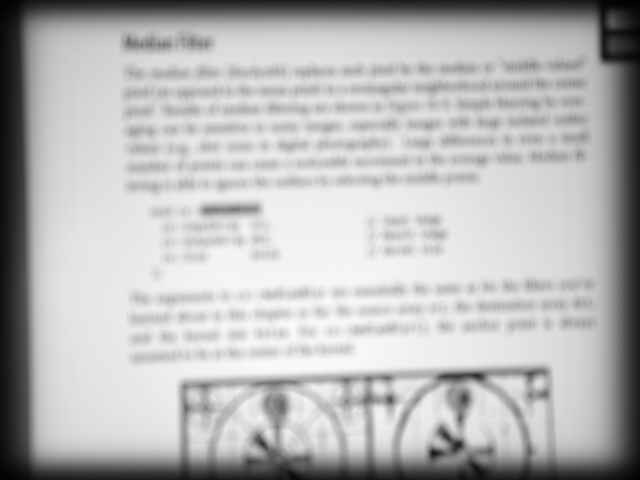
本页中的散焦图像是真实世界的图像。散焦是通过相机光学器件手动实现的。

什么是图像退化模型?

以下是频域表示的图像退化数学模型

\[S = H\cdot U + N\]

其中 \(S\) 是模糊(退化)图像的频谱,\(U\) 是原始真实(未退化)图像的频谱,\(H\) 是点扩散函数(PSF)的频率响应,\(N\) 是加性噪声的频谱。

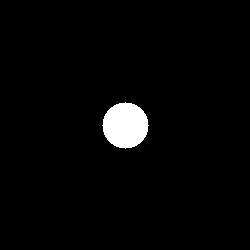
圆形PSF是散焦失真的良好近似。这种PSF仅由一个参数——半径 \(R\) 来指定。本研究中使用圆形PSF。

圆形点扩散函数

如何恢复模糊图像?

恢复(去模糊)的目标是获得原始图像的估计。频域中的恢复公式为

\[U' = H_w\cdot S\]

其中 \(U'\) 是原始图像 \(U\) 估计的频谱,\(H_w\) 是恢复滤波器,例如维纳滤波器。

什么是维纳(Wiener)滤波器?

维纳滤波器是一种恢复模糊图像的方法。假设PSF是一个实对称信号,原始真实图像和噪声的功率谱未知,则简化的维纳公式为

\[H_w = \frac{H}{|H|^2+\frac{1}{SNR}} \]

其中 \(SNR\) 是信噪比。

因此,为了通过维纳滤波器恢复散焦图像,需要知道圆形PSF的 \(SNR\) 和 \(R\)。

源代码

您可以在OpenCV源代码库的 samples/cpp/tutorial_code/ImgProc/out_of_focus_deblur_filter/out_of_focus_deblur_filter.cpp 中找到源代码。

#include <iostream>
using namespace cv;
using namespace std;
void help();
void calcPSF(Mat& outputImg, Size filterSize, int R);
void fftshift(const Mat& inputImg, Mat& outputImg);
void filter2DFreq(const Mat& inputImg, Mat& outputImg, const Mat& H);
void calcWnrFilter(const Mat& input_h_PSF, Mat& output_G, double nsr);
const String keys =
"{help h usage ? | | 打印此消息 }"
"{image |original.jpg | input image name }"
"{R |5 | radius }"
"{SNR |100 | signal to noise ratio}"
;
int main(int argc, char *argv[])
{
help();
CommandLineParser parser(argc, argv, keys);
if (parser.has("help"))
{
parser.printMessage();
return 0;
}
int R = parser.get<int>("R");
int snr = parser.get<int>("SNR");
string strInFileName = parser.get<String>("image");
samples::addSamplesDataSearchSubDirectory("doc/tutorials/imgproc/out_of_focus_deblur_filter/images");
if (!parser.check())
{
parser.printErrors();
return 0;
}
Mat imgIn;
imgIn = imread(samples::findFile( strInFileName ), IMREAD_GRAYSCALE);
if (imgIn.empty()) //check whether the image is loaded or not
{
cout << "ERROR : Image cannot be loaded..!!" << endl;
return -1;
}
Mat imgOut;
// it needs to process even image only
Rect roi = Rect(0, 0, imgIn.cols & -2, imgIn.rows & -2);
//Hw calculation (start)
Mat Hw, h;
calcPSF(h, roi.size(), R);
calcWnrFilter(h, Hw, 1.0 / double(snr));
//Hw calculation (stop)
// filtering (start)
filter2DFreq(imgIn(roi), imgOut, Hw);
// filtering (stop)
imgOut.convertTo(imgOut, CV_8U);
normalize(imgOut, imgOut, 0, 255, NORM_MINMAX);
imshow("Original", imgIn);
imshow("Debluring", imgOut);
imwrite("result.jpg", imgOut);
waitKey(0);
return 0;
}
void help()
{
cout << "2018-07-12" << endl;
cout << "DeBlur_v8" << endl;
cout << "You will learn how to recover an out-of-focus image by Wiener filter" << endl;
}
void calcPSF(Mat& outputImg, Size filterSize, int R)
{
Mat h(filterSize, CV_32F, Scalar(0));
Point point(filterSize.width / 2, filterSize.height / 2);
circle(h, point, R, 255, -1, 8);
Scalar summa = sum(h);
outputImg = h / summa[0];
}
void fftshift(const Mat& inputImg, Mat& outputImg)
{
outputImg = inputImg.clone();
int cx = outputImg.cols / 2;
int cy = outputImg.rows / 2;
Mat q0(outputImg, Rect(0, 0, cx, cy));
Mat q1(outputImg, Rect(cx, 0, cx, cy));
Mat q2(outputImg, Rect(0, cy, cx, cy));
Mat q3(outputImg, Rect(cx, cy, cx, cy));
Mat tmp;
q0.copyTo(tmp);
q3.copyTo(q0);
tmp.copyTo(q3);
q1.copyTo(tmp);
q2.copyTo(q1);
tmp.copyTo(q2);
}
void filter2DFreq(const Mat& inputImg, Mat& outputImg, const Mat& H)
{
Mat planes[2] = { Mat_<float>(inputImg.clone()), Mat::zeros(inputImg.size(), CV_32F) };
Mat complexI;
merge(planes, 2, complexI);
dft(complexI, complexI, DFT_SCALE);
Mat planesH[2] = { Mat_<float>(H.clone()), Mat::zeros(H.size(), CV_32F) };
Mat complexH;
merge(planesH, 2, complexH);
Mat complexIH;
mulSpectrums(complexI, complexH, complexIH, 0);
idft(complexIH, complexIH);
split(complexIH, planes);
outputImg = planes[0];
}
void calcWnrFilter(const Mat& input_h_PSF, Mat& output_G, double nsr)
{
Mat h_PSF_shifted;
fftshift(input_h_PSF, h_PSF_shifted);
Mat planes[2] = { Mat_<float>(h_PSF_shifted.clone()), Mat::zeros(h_PSF_shifted.size(), CV_32F) };
Mat complexI;
merge(planes, 2, complexI);
dft(complexI, complexI);
split(complexI, planes);
Mat denom;
pow(abs(planes[0]), 2, denom);
denom += nsr;
divide(planes[0], denom, output_G);
}
如果数组没有元素,则返回 true。
int64_t int64
从 Mat 派生的模板矩阵类。
定义 mat.hpp:2257
n 维密集数组类
定义 mat.hpp:830
CV_NODISCARD_STD Mat clone() const
创建数组及其底层数据的完整副本。
MatSize size
定义 mat.hpp:2187
void copyTo(OutputArray m) const
将矩阵复制到另一个矩阵。
int cols
定义 mat.hpp:2165
cv::getTickFrequency
double getTickFrequency()
int rows
行数和列数,如果矩阵有超过2个维度,则为 (-1, -1)
定义 mat.hpp:2165
void convertTo(OutputArray m, int rtype, double alpha=1, double beta=0) const
使用可选缩放将数组转换为另一种数据类型。
2D 矩形的模板类。
定义 types.hpp:444
Size_< _Tp > size() const
矩形的大小 (宽度, 高度)
用于指定图像或矩形大小的模板类。
Definition types.hpp:335
_Tp height
高度
Definition types.hpp:363
_Tp width
宽度
Definition types.hpp:362
void split(const Mat &src, Mat *mvbegin)
将多通道数组拆分为多个单通道数组。
void mulSpectrums(InputArray a, InputArray b, OutputArray c, int flags, bool conjB=false)
对两个傅里叶频谱进行逐元素乘法。
void divide(InputArray src1, InputArray src2, OutputArray dst, double scale=1, int dtype=-1)
对两个数组或标量与数组进行逐元素除法。
Scalar sum(InputArray src)
计算数组元素的和。
void merge(const Mat *mv, size_t count, OutputArray dst)
将多个单通道数组合并为一个多通道数组。
void idft(InputArray src, OutputArray dst, int flags=0, int nonzeroRows=0)
计算一维或二维数组的逆离散傅里叶变换。
void dft(InputArray src, OutputArray dst, int flags=0, int nonzeroRows=0)
对一维或二维浮点数组执行正向或逆向离散傅里叶变换。
std::string String
定义 cvstd.hpp:151
CV_8U
#define CV_8U
#define CV_32F
Definition interface.h:78
@ circle
定义 gr_skig.hpp:62
int main(int argc, char *argv[])
定义 highgui_qt.cpp:3
定义 core.hpp:107
STL 命名空间。

解释

散焦图像恢复算法包括PSF生成、维纳滤波器生成和在频域中滤波模糊图像。

// it needs to process even image only
Rect roi = Rect(0, 0, imgIn.cols & -2, imgIn.rows & -2);
//Hw calculation (start)
Mat Hw, h;
calcPSF(h, roi.size(), R);
calcWnrFilter(h, Hw, 1.0 / double(snr));
//Hw calculation (stop)
// filtering (start)
filter2DFreq(imgIn(roi), imgOut, Hw);
// filtering (stop)

函数 calcPSF() 根据输入参数半径 \(R\) 生成圆形PSF。

void calcPSF(Mat& outputImg, Size filterSize, int R)
{
Mat h(filterSize, CV_32F, Scalar(0));
Point point(filterSize.width / 2, filterSize.height / 2);
circle(h, point, R, 255, -1, 8);
Scalar summa = sum(h);
outputImg = h / summa[0];
}

函数 calcWnrFilter() 根据上述公式合成简化的维纳滤波器 \(H_w\)。

void calcWnrFilter(const Mat& input_h_PSF, Mat& output_G, double nsr)
{
Mat h_PSF_shifted;
fftshift(input_h_PSF, h_PSF_shifted);
Mat planes[2] = { Mat_<float>(h_PSF_shifted.clone()), Mat::zeros(h_PSF_shifted.size(), CV_32F) };
Mat complexI;
merge(planes, 2, complexI);
dft(complexI, complexI);
split(complexI, planes);
Mat denom;
pow(abs(planes[0]), 2, denom);
denom += nsr;
divide(planes[0], denom, output_G);
}

函数 fftshift() 重新排列PSF。此代码直接复制自教程 离散傅里叶变换

void fftshift(const Mat& inputImg, Mat& outputImg)
{
outputImg = inputImg.clone();
int cx = outputImg.cols / 2;
int cy = outputImg.rows / 2;
Mat q0(outputImg, Rect(0, 0, cx, cy));
Mat q1(outputImg, Rect(cx, 0, cx, cy));
Mat q2(outputImg, Rect(0, cy, cx, cy));
Mat q3(outputImg, Rect(cx, cy, cx, cy));
Mat tmp;
q0.copyTo(tmp);
q3.copyTo(q0);
tmp.copyTo(q3);
q1.copyTo(tmp);
q2.copyTo(q1);
tmp.copyTo(q2);
}

函数 filter2DFreq() 在频域中滤波模糊图像。

void filter2DFreq(const Mat& inputImg, Mat& outputImg, const Mat& H)
{
Mat planes[2] = { Mat_<float>(inputImg.clone()), Mat::zeros(inputImg.size(), CV_32F) };
Mat complexI;
merge(planes, 2, complexI);
dft(complexI, complexI, DFT_SCALE);
Mat planesH[2] = { Mat_<float>(H.clone()), Mat::zeros(H.size(), CV_32F) };
Mat complexH;
merge(planesH, 2, complexH);
Mat complexIH;
mulSpectrums(complexI, complexH, complexIH, 0);
idft(complexIH, complexIH);
split(complexIH, planes);
outputImg = planes[0];
}

结果

下方您可以看到真实的散焦图像:

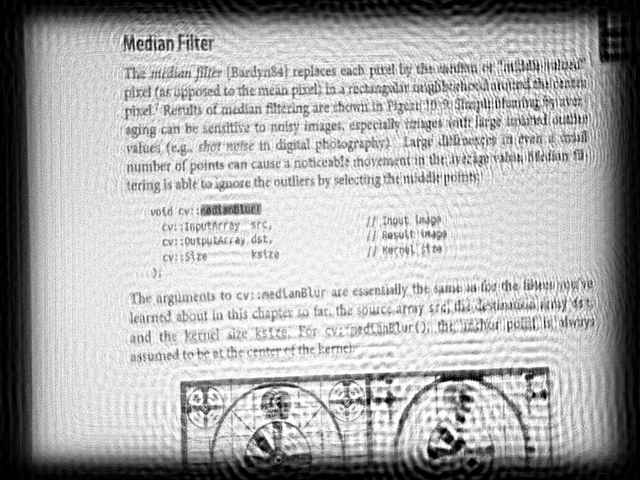
以下结果是使用 \(R\) = 53 和 \(SNR\) = 5200 参数计算得出的:

使用了维纳滤波器,并手动选择了 \(R\) 和 \(SNR\) 的值以提供最佳的视觉效果。我们可以看到结果并不完美,但它为我们提供了图像内容的线索。经过一些努力,文本是可以阅读的。

注意
参数 \(R\) 最为重要。因此您应该首先调整 \(R\),然后是 \(SNR\)。
有时您可能会在恢复的图像中观察到振铃效应。这种效应可以通过多种方法减少。例如,您可以对输入图像边缘进行渐细处理。

您还可以在 YouTube 上找到一个快速视频演示。

参考文献