目标
在本教程中,您将学习如何使用重建 API 进行稀疏重建
- 加载包含图像路径列表的文件。
- 运行 libmv 重建流程。
- 使用 Viz 显示获得的结果。
代码
#include <iostream>
#include <fstream>
static void help() {
cout
<< "\n------------------------------------------------------------------------------------\n"
<< " 这个程序展示了 OpenCV 运动结构 (SFM) 模块中的多视图重建能力。\n"
<< " 它可以从一组 2D 图像重建场景\n"
<< " 用法:\n"
<< " example_sfm_scene_reconstruction <文件路径> <f> <cx> <cy>\n"
<< " 其中:文件路径是系统中包含的文件的绝对路径\n"
<< " 用于重建的图像列表。\n"
<< " f 是焦距,以像素为单位。\n"
<< " cx 是图像主点的 x 坐标,以像素为单位。\n"
<< " cy 是图像主点的 y 坐标,以像素为单位。\n"
<< "------------------------------------------------------------------------------------\n\n"
static int getdir(const string _filename, vector<String> &files)
<< endl;
}
ifstream myfile(_filename.c_str());
{
if (!myfile.is_open()) {
cout << "无法读取文件: " << _filename << endl;
} else {;
exit(0);
size_t found = _filename.find_last_of("/\\");
string line_str, path_to_file = _filename.substr(0, found);
while ( getline(myfile, line_str) )
files.push_back(path_to_file+string("/")+line_str);
int main(
int argc,
char* argv[])
}
return 1;
}
// 读取输入参数
{
// 解析图像路径
{
help();
exit(0);
}
getdir( argv[1], images_paths );
// 构建内参
cx = atof(argv[3]), cy = atof(argv[4]);
0, f, cy,
bool is_projective = true;
0, 0, 1);
vector<Mat> Rs_est, ts_est, points3d_estimated;
reconstruct(images_paths, Rs_est, ts_est, K, points3d_estimated, is_projective);
// 打印输出
cout << "重建结果: " << endl;
cout << "============================" << endl;
cout << "估计的 3D 点: " << points3d_estimated.size() << endl;
cout << "估计的相机: " << Rs_est.size() << endl;
cout << "精炼的内参: " << endl << K << endl << endl;
cout << "3D 可视化: " << endl;
cout << "估计的 3D 点: " << points3d_estimated.size() << endl;
window.setWindowSize(
Size(500,500));
window.setWindowPosition(
Point(150,150));
window.setBackgroundColor();
// 创建点云
// 恢复估计的 points3d
for (int i = 0; i < points3d_estimated.size(); ++i)
point_cloud_est.push_back(
Vec3f(points3d_estimated[i]));
cout << "[完成]" << endl;
cout << "正在恢复相机 ... ";
vector<Affine3d> path;
for (size_t i = 0; i < Rs_est.size(); ++i)
path.push_back(
Affine3d(Rs_est[i],ts_est[i]));
if ( point_cloud_est.size() > 0 )
cout << "正在恢复相机 ... ";
cout << "正在渲染点 ... ";
{
viz::WCloud cloud_widget(point_cloud_est, viz::Color::green());
window.showWidget("point_cloud", cloud_widget);
cout << "无法渲染点:空点云" << endl;
cout << "正在恢复相机 ... ";
}
else
{
if ( path.size() > 0 )
}
cout << "正在渲染相机 ... ";
{
window.showWidget(
"cameras_frames_and_lines",
viz::WTrajectory(path, viz::WTrajectory::BOTH, 0.1, viz::Color::green()));
window.setViewerPose(path[0]);
cout << "无法渲染相机:空路径" << endl;
cout << "正在恢复相机 ... ";
}
else
{
cout << endl << "按 'q' 关闭每个窗口 ... " << endl;
}
window.spin();
cv::Affine3
return 0;
}
定义 affine.hpp:127
cv::Matx< double, 3, 3 >
用于指定图像或矩形大小的模板类。
Definition types.hpp:335
此 3D 小部件表示轨迹。
定义 viz3d.hpp:68
点云.
Definition widgets.hpp:681
定义 widgets.hpp:628
定义 widgets.hpp:605
从 2d 对应点重建 3d 点,同时执行自校准。
定义 conditioning.hpp:44
int main(int argc, char *argv[])
定义 highgui_qt.cpp:3
首先,我们需要加载包含图像路径列表的文件,以便为重建 API 提供数据
/home/eriba/software/opencv_contrib/modules/sfm/samples/data/images/resized_IMG_2889.jpg
/home/eriba/software/opencv_contrib/modules/sfm/samples/data/images/resized_IMG_2890.jpg
/home/eriba/software/opencv_contrib/modules/sfm/samples/data/images/resized_IMG_2891.jpg
/home/eriba/software/opencv_contrib/modules/sfm/samples/data/images/resized_IMG_2892.jpg
int getdir(const string _filename, vector<string> &files)
...
string line_str;
{
if (!myfile.is_open()) {
cout << "无法读取文件: " << _filename << endl;
} else {;
exit(0);
} else {
files.push_back(line_str);
files.push_back(path_to_file+string("/")+line_str);
其次,构建的容器将用于为重建 API 提供数据。重要的是要指出,估计的结果必须存储在 vector<Mat> 中。在这种情况下,调用的是真实图像的重载签名,它从图像中内部提取和计算稀疏 2d 特征,使用 DAISY 描述符,以便使用 FlannBasedMatcher 进行匹配并构建轨迹结构。
}
return 1;
}
reconstruct(images_paths, Rs_est, ts_est, K, points3d_estimated, is_projective);
vector<Mat> Rs_est, ts_est, points3d_estimated;
reconstruct(images_paths, Rs_est, ts_est, K, points3d_estimated, is_projective);
最后,获得的结果将显示在 Viz 中。
cout << "重建结果: " << endl;
cout << "============================" << endl;
cout << "估计的 3D 点: " << points3d_estimated.size() << endl;
cout << "估计的相机: " << Rs_est.size() << endl;
cout << "精炼的内参: " << endl << K << endl << endl;
cout << "3D 可视化: " << endl;
用法和结果
为了运行此示例,我们需要指定图像路径文件的路径、相机的焦距以及中心投影坐标(以像素为单位)。
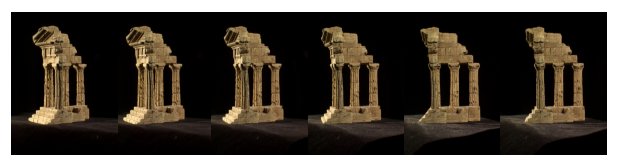
1. Middlebury 神庙
使用以下图像序列 [1] 和以下相机参数,我们可以计算稀疏 3d 重建
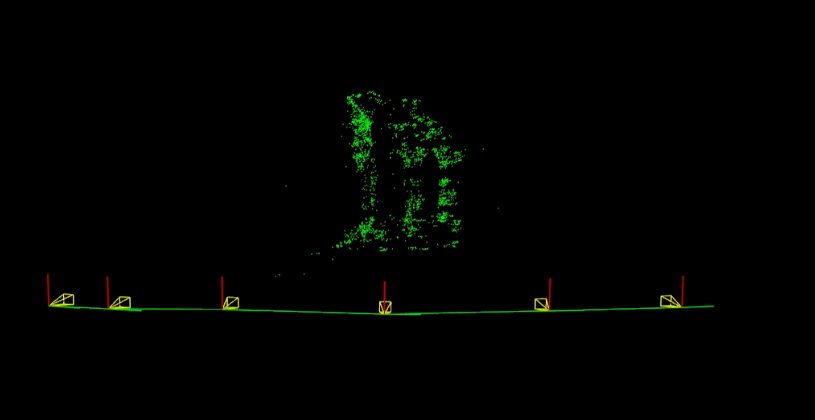
./example_sfm_scene_reconstruction image_paths_file.txt 800 400 225
下图显示了获得的相机运动以及估计的稀疏 3d 重建
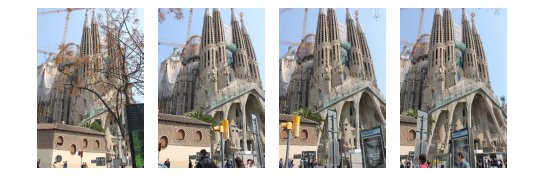
2. 圣家堂
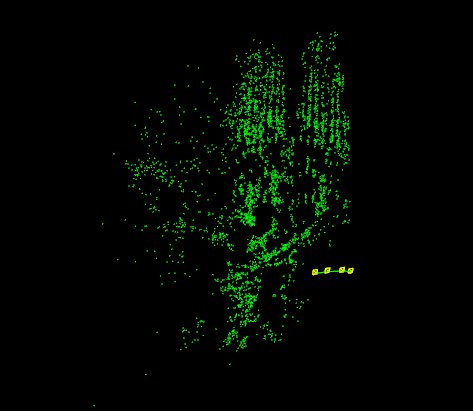
使用以下图像序列 [2] 和以下相机参数,我们可以计算稀疏 3d 重建
./example_sfm_scene_reconstruction image_paths_file.txt 350 240 360
2. 圣家堂
[2] Penate Sanchez, A. and Moreno-Noguer, F. and Andrade Cetto, J. and Fleuret, F. (2014). LETHA: Learning from High Quality Inputs for 3D Pose Estimation in Low Quality Images. Proceedings of the International Conference on 3D vision (3DV). URL
生成于 2025 年 7 月 3 日星期四 12:14:36,适用于 OpenCV,作者: 1.12.0

 1.12.0