#include <vector>
#include <iostream>
#include <iomanip>
#include "stats.h"
#include "utils.h"
const double akaze_thresh = 3e-4;
const double ransac_thresh = 2.5f;
const double nn_match_ratio = 0.8f;
const int bb_min_inliers = 100;
const int stats_update_period = 10;
namespace example {
{
public:
detector(_detector),
matcher(_matcher)
{}
void setFirstFrame(
const Mat frame, vector<Point2f> bb,
string title, Stats& stats);
Mat process(
const Mat frame, Stats& stats);
return detector;
}
保护:
Mat first_frame, first_desc;
vector<KeyPoint> first_kp;
vector<Point2f> object_bb;
};
void Tracker::setFirstFrame(
const Mat frame, vector<Point2f> bb,
string title, Stats& stats)
{
const Point* ptContain = { &ptMask[0] };
int iSize = static_cast<int>(bb.size());
for (size_t i=0; i<bb.size(); i++) {
ptMask[i].
x =
static_cast<int>(bb[i].x);
ptMask[i].
y =
static_cast<int>(bb[i].y);
}
first_frame = frame.
clone();
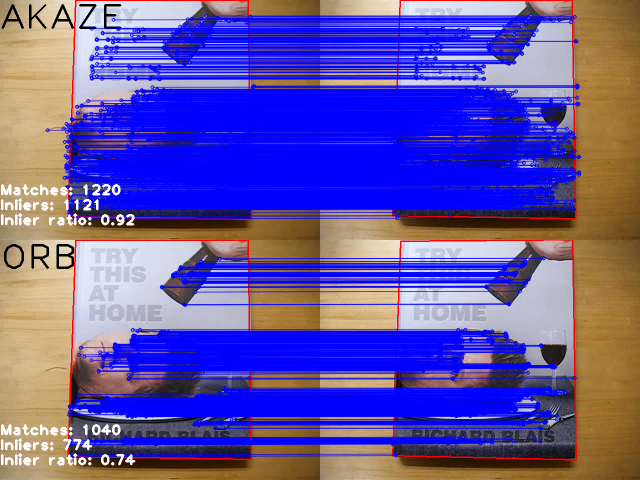
detector->detectAndCompute(first_frame, matMask, first_kp, first_desc);
stats.keypoints = (int)first_kp.size();
drawBoundingBox(first_frame, bb);
putText(first_frame, title,
Point(0, 60), FONT_HERSHEY_PLAIN, 5, Scalar::all(0), 4);
object_bb = bb;
delete[] ptMask;
}
Mat Tracker::process(
const Mat frame, Stats& stats)
{
vector<KeyPoint> kp;
detector->detectAndCompute(frame,
noArray(), kp, desc);
stats.keypoints = (int)kp.size();
vector< vector<DMatch> > matches;
vector<KeyPoint> matched1, matched2;
matcher->knnMatch(first_desc, desc, matches, 2);
for(unsigned i = 0; i < matches.size(); i++) {
if(matches[i][0].distance < nn_match_ratio * matches[i][1].distance) {
matched1.push_back(first_kp[matches[i][0].queryIdx]);
matched2.push_back( kp[matches[i][0].trainIdx]);
}
}
stats.matches = (int)matched1.size();
Mat inlier_mask, homography;
vector<KeyPoint> inliers1, inliers2;
vector<DMatch> inlier_matches;
if(matched1.size() >= 4) {
RANSAC, ransac_thresh, inlier_mask);
}
if(matched1.size() < 4 || homography.
empty()) {
stats.inliers = 0;
stats.ratio = 0;
return res;
}
for(unsigned i = 0; i < matched1.size(); i++) {
int new_i = static_cast<int>(inliers1.size());
inliers1.push_back(matched1[i]);
inliers2.push_back(matched2[i]);
inlier_matches.push_back(
DMatch(new_i, new_i, 0));
}
}
stats.inliers = (int)inliers1.size();
stats.ratio = stats.inliers * 1.0 / stats.matches;
vector<Point2f> new_bb;
if(stats.inliers >= bb_min_inliers) {
drawBoundingBox(frame_with_bb, new_bb);
}
drawMatches(first_frame, inliers1, frame_with_bb, inliers2,
inlier_matches, res,
return res;
}
}
int main(
int argc,
char **argv)
{
CommandLineParser parser(argc, argv,
"{@input_path |0|input path can be a camera id, like 0,1,2 or a video filename}");
parser.printMessage();
string input_path = parser.get<string>(0);
string video_name = input_path;
if ( ( isdigit(input_path[0]) && input_path.size() == 1 ) )
{
int camera_no = input_path[0] - '0';
video_in.
open( camera_no );
}
else {
video_in.
open(video_name);
}
cerr << "Couldn't open " << video_name << endl;
return 1;
}
Stats stats, akaze_stats, orb_stats;
akaze->setThreshold(akaze_thresh);
example::Tracker akaze_tracker(akaze, matcher);
example::Tracker orb_tracker(orb, matcher);
cout << "\nPress any key to stop the video and select a bounding box" << endl;
{
video_in >> frame;
}
vector<Point2f> bb;
bb.push_back(
cv::Point2f(
static_cast<float>(uBox.
x),
static_cast<float>(uBox.
y)));
bb.push_back(
cv::Point2f(
static_cast<float>(uBox.
x+uBox.
width),
static_cast<float>(uBox.
y)));
akaze_tracker.setFirstFrame(frame, bb, "AKAZE", stats);
orb_tracker.setFirstFrame(frame, bb, "ORB", stats);
Stats akaze_draw_stats, orb_draw_stats;
Mat akaze_res, orb_res, res_frame;
int i = 0;
for(;;) {
i++;
bool update_stats = (i % stats_update_period == 0);
video_in >> frame;
if(frame.empty()) break;
akaze_res = akaze_tracker.process(frame, stats);
akaze_stats += stats;
if(update_stats) {
akaze_draw_stats = stats;
}
orb->setMaxFeatures(stats.keypoints);
orb_res = orb_tracker.process(frame, stats);
orb_stats += stats;
if(update_stats) {
orb_draw_stats = stats;
}
drawStatistics(akaze_res, akaze_draw_stats);
drawStatistics(orb_res, orb_draw_stats);
vconcat(akaze_res, orb_res, res_frame);
}
akaze_stats /= i - 1;
orb_stats /= i - 1;
printStatistics("AKAZE", akaze_stats);
printStatistics("ORB", orb_stats);
return 0;
}
如果数组没有元素,则返回 true。
int64_t int64
用于匹配关键点描述符的类。
定义 types.hpp:849
CV_NODISCARD_STD Mat clone() const
创建数组及其底层数据的完整副本。
MatSize size
定义 mat.hpp:2187
static CV_NODISCARD_STD MatExpr zeros(int rows, int cols, int type)
返回指定大小和类型的全零数组。
_Tp & at(int i0=0)
返回指定数组元素的引用。
cv::getTickFrequency
double getTickFrequency()
_Tp y
点的 y 坐标
定义 types.hpp:202
_Tp x
点的 x 坐标
定义 types.hpp:201
2D 矩形的模板类。
定义 types.hpp:444
_Tp x
左上角的 x 坐标
定义 types.hpp:487
_Tp y
左上角的 y 坐标
定义 types.hpp:488
_Tp width
矩形的宽度
定义 types.hpp:489
_Tp height
矩形的高度
定义 types.hpp:490
static Scalar_< double > all(double v0)
一个用于测量流逝时间的类。
定义 utility.hpp:326
void start()
开始计时。
定义 utility.hpp:335
double getTimeSec() const
返回经过时间(秒)。
定义 utility.hpp:371
void stop()
停止计时。
定义 utility.hpp:341
长期跟踪器的基类抽象类。
定义 tracking.hpp:729
用于从视频文件、图像序列或摄像机捕获视频的类。
Definition videoio.hpp:772
virtual bool open(const String &filename, int apiPreference=CAP_ANY)
打开视频文件、捕获设备或 IP 视频流进行视频捕获。
virtual bool isOpened() const
如果视频捕获已初始化,则返回 true。
Mat findHomography(InputArray srcPoints, InputArray dstPoints, int method=0, double ransacReprojThreshold=3, OutputArray mask=noArray(), const int maxIters=2000, const double confidence=0.995)
在两个平面之间找到透视变换。
void vconcat(const Mat *src, size_t nsrc, OutputArray dst)
对给定矩阵执行垂直连接。
void perspectiveTransform(InputArray src, OutputArray dst, InputArray m)
执行向量的透视矩阵变换。
void hconcat(const Mat *src, size_t nsrc, OutputArray dst)
对给定矩阵进行水平连接。
std::shared_ptr< _Tp > Ptr
Definition cvstd_wrapper.hpp:23
InputOutputArray noArray()
template<typename
_Tp , int m, int n>
#define CV_8UC1
定义 interface.h:88
void drawMatches(InputArray img1, const std::vector< KeyPoint > &keypoints1, InputArray img2, const std::vector< KeyPoint > &keypoints2, const std::vector< DMatch > &matches1to2, InputOutputArray outImg, const Scalar &matchColor=Scalar::all(-1), const Scalar &singlePointColor=Scalar::all(-1), const std::vector< char > &matchesMask=std::vector< char >(), DrawMatchesFlags flags=DrawMatchesFlags::DEFAULT)
绘制两幅图像中找到的关键点匹配。
void imshow(const String &winname, InputArray mat)
在指定窗口中显示图像。
int waitKey(int delay=0)
等待按键按下。
void namedWindow(const String &winname, int flags=WINDOW_AUTOSIZE)
创建窗口。
void resizeWindow(const String &winname, int width, int height)
将窗口调整到指定大小。
Rect selectROI(const String &windowName, InputArray img, bool showCrosshair=true, bool fromCenter=false, bool printNotice=true)
允许用户在给定图像上选择一个ROI。
void fillPoly(InputOutputArray img, InputArrayOfArrays pts, const Scalar &color, int lineType=LINE_8, int shift=0, Point offset=Point())
填充一个或多个多边形所包围的区域。
void putText(InputOutputArray img, const String &text, Point org, int fontFace, double fontScale, Scalar color, int thickness=1, int lineType=LINE_8, bool bottomLeftOrigin=false)
绘制文本字符串。
int main(int argc, char *argv[])
定义 highgui_qt.cpp:3

 1.12.0 版的 Doxygen 于 2025 年 7 月 3 日星期四 12:14:35 为 OpenCV 生成