目标
在本教程中,您将学习如何从使用 Bundler [1] 获取的给定文件中导入重建。
- 加载包含一组相机和 3D 点的文件。
- 使用 Viz 显示获得的结果。
代码
#include <iostream>
static void help() {
cout
<< "\n---------------------------------------------------------------------------\n"
<< " 此程序演示如何在 OpenCV 运动结构 (SFM) 模块中导入重建场景。\n"
<< " OpenCV 运动结构 (SFM) 模块。\n"
<< " example_sfm_scene_reconstruction <文件路径> <f> <cx> <cy>\n"
<< " example_sfm_import_reconstruction <path_to_file>\n"
<< " 其中:file_path 是系统中包含重建场景的绝对路径文件。\n"
<< " 重建的场景。\n"
<< "---------------------------------------------------------------------------\n\n"
<< endl;
}
int main(
int argc,
char* argv[])
{
if ( argc != 2 ) {
help();
exit(0);
}
vector<Mat> Rs, Ts, Ks, points3d;
importReconstruction(argv[1], Rs, Ts, Ks, points3d, SFM_IO_BUNDLER);
window.setWindowSize(
Size(500,500));
window.setWindowPosition(
Point(150,150));
window.setBackgroundColor();
vector<Vec3d> point_cloud;
for (int i = 0; i < points3d.size(); ++i){
point_cloud.push_back(
Vec3f(points3d[i]));
}
for (size_t i = 0; i < Rs_est.size(); ++i)
for (size_t i = 0; i < Rs.size(); ++i)
viz::WCloud cloud_widget(point_cloud, viz::Color::green());
viz::Color::yellow());
window.showWidget("point_cloud", cloud_widget);
window.showWidget("cameras", trajectory);
window.showWidget("frustums", frustums);
cout << endl << "按 'q' 关闭每个窗口 ... " << endl;
cv::Affine3
return 0;
}
定义 affine.hpp:127
cv::Matx< double, 3, 3 >
用于指定图像或矩形大小的模板类。
Definition types.hpp:335
Viz3d 类表示 3D 可视化窗口。此类是隐式共享的。
定义 viz3d.hpp:68
点云.
Definition widgets.hpp:681
此 3D 小部件表示轨迹。
定义 widgets.hpp:605
int main(int argc, char *argv[])
定义 highgui_qt.cpp:3
结果
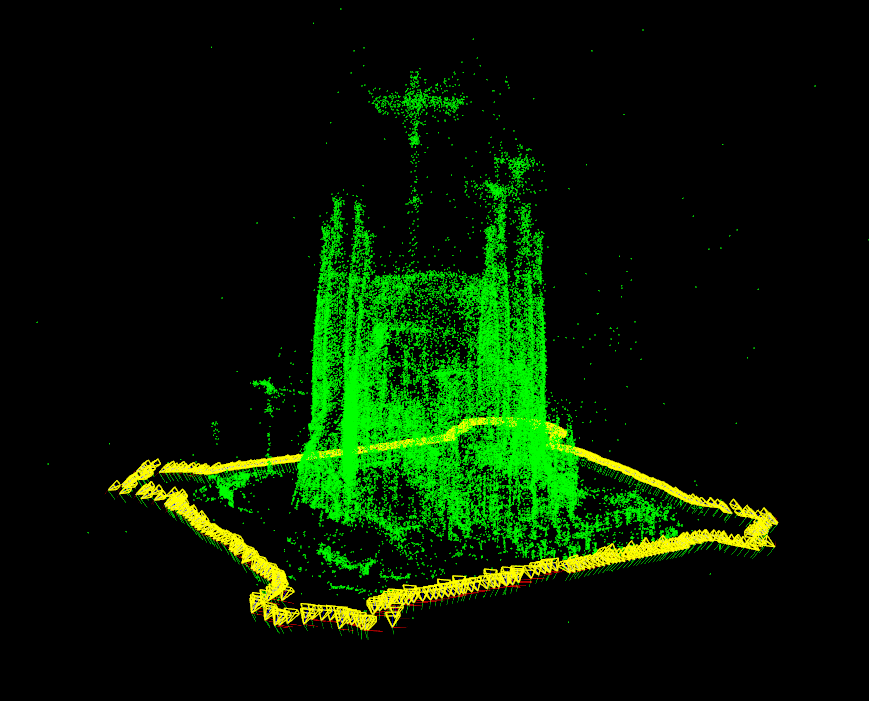
下图显示了使用数据集 [2] 从圣家族教堂 (BCN) 的重建。
[1] http://www.cs.cornell.edu/~snavely/bundler
[2] Penate Sanchez, A. and Moreno-Noguer, F. and Andrade Cetto, J. and Fleuret, F. (2014). LETHA: Learning from High Quality Inputs for 3D Pose Estimation in Low Quality Images. Proceedings of the International Conference on 3D vision (3DV). URL

 1.12.0