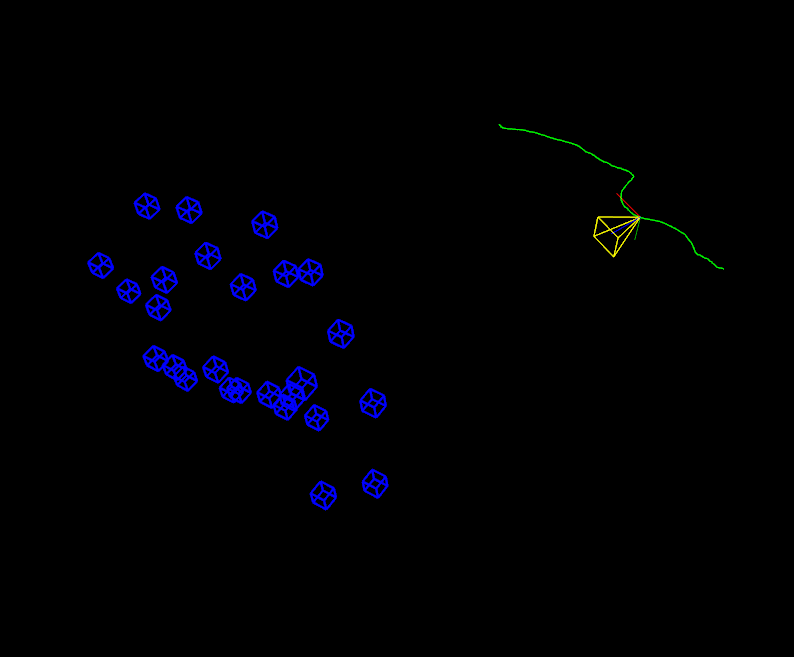
#include <iostream>
#include <fstream>
static void help() {
cout
<< "\n------------------------------------------------------------------\n"
<< " 这个程序展示了 OpenCV 运动结构 (SFM) 模块中的相机轨迹重建能力。\n"
<< " \n"
<< " \n"
<< " example_sfm_scene_reconstruction <文件路径> <f> <cx> <cy>\n"
<< " example_sfm_trajectory_reconstruction <tracks_file_path> <f> <cx> <cy>\n"
<< " 其中:是轨道文件在您系统中的绝对路径。\n"
<< " \n"
<< " 该文件必须具有以下格式:\n"
<< " row1 : track 1 的 x1 y1 x2 y2 ... x36 y36\n"
<< " row2 : track 2 的 x1 y1 x2 y2 ... x36 y36\n"
<< " 等等\n"
<< " \n"
<< " 即,一行给出某个点在帧 1 到 36 中被跟踪时测量的 2D 位置。如果在一个视图中没有找到匹配项,则 x\n"
<< " 和 y 是 -1。\n"
<< " 每行对应于一个不同的点。\n"
<< " \n"
<< " f 是以像素为单位的焦距。\n"
<< " \n"
<< " cx 是图像主点的 x 坐标,以像素为单位。\n"
<< " cy 是图像主点的 y 坐标,以像素为单位。\n"
<< "------------------------------------------------------------------\n\n"
/* 构建以下结构数据
<< endl;
}
if (!myfile.is_open())
{
if (!myfile.is_open()) {
cout << "无法读取文件:" << _filename << endl;
{
double x, y;
exit(0);
} else {
int n_frames = 0, n_tracks = 0;
files.push_back(line_str);
// 从文本文件中提取数据
for ( ; getline(myfile,line_str); ++n_tracks)
istringstream line(line_str);
{
vector<Vec2d> track;
for ( n_frames = 0; line >> x >> y; ++n_frames)
if ( x > 0 && y > 0)
{
track.push_back(
Vec2d(x,y));
track.push_back(
Vec2d(-1));
else
tracks.push_back(track);
}
// 将数据嵌入重建 API 格式
}
{
for (int j = 0; j < n_tracks; ++j)
frame(0,j) = tracks[j][i][0];
{
frame(1,j) = tracks[j][i][1];
points2d.push_back(
Mat(frame));
}
myfile.close();
}
/* 键盘回调来控制 3D 可视化
}
}
{
camera_pov = !camera_pov;
/* 示例主代码
}
// 从文本文件中读取 2D 点
{
// 解析图像路径
{
help();
exit(0);
}
parser_2D_tracks( argv[1], points2d );
// 设置相机校准矩阵
bool is_projective = true;
bool is_projective = true;
0, 0, 1);
reconstruct(points2d, Rs_est, ts_est, K, points3d_estimated, is_projective);
reconstruct(images_paths, Rs_est, ts_est, K, points3d_estimated, is_projective);
cout << "\n----------------------------\n" << endl;
cout << "重建:" << endl;
cout << "============================" << endl;
cout << "估计的 3D 点:" << points3d_estimated.size() << endl;
cout << "估计的相机:" << Rs_est.size() << endl;
cout << "精炼的内参:" << endl << K << endl << endl;
cout << "3D 可视化:" << endl;
cout << "估计的 3D 点:" << points3d_estimated.size() << endl;
window_est.setBackgroundColor();
window_est.registerKeyboardCallback(&keyboard_callback);
cout << "恢复点 ... ";
for (int i = 0; i < points3d_estimated.size(); ++i)
for (int i = 0; i < points3d_estimated.size(); ++i)
point_cloud_est.push_back(
Vec3f(points3d_estimated[i]));
cout << "[完成]" << endl;
cout << "恢复相机 ... ";
vector<Affine3d> path_est;
for (size_t i = 0; i < Rs_est.size(); ++i)
path_est.push_back(
Affine3d(Rs_est[i],ts_est[i]));
cout << "渲染轨迹 ... ";
cout << "恢复相机 ... ";
cout << endl << "按:" << endl;
cout << " 's' 切换相机视角" << endl;
cout << " 'q' 关闭窗口" << endl;
if ( path_est.size() > 0 )
// 动画轨迹
{
while(!window_est.wasStopped())
for (size_t i = 0; i < point_cloud_est.size(); ++i)
{
Vec3d point = point_cloud_est[i];
{
char buffer[50];
sprintf (buffer, "%d", static_cast<int>(i));
cube_widget.setRenderingProperty(viz::LINE_WIDTH, 2.0);
window_est.showWidget(
"Cube"+
String(buffer), cube_widget, point_pose);
}
if ( camera_pov )
window_est.setViewerPose(cam_pose);
// 渲染完整的轨迹
else
{
window_est.showWidget("CPW", cpw, cam_pose);
window_est.showWidget("CPW_FRUSTUM", cpw_frustum, cam_pose);
// 更新轨迹索引(弹簧效果)
}
// 帧率 1s
window_est.removeAllWidgets();
指定其坐标 x、y 和 z 的 3D 点的模板类。
}
}
return 0;
}
定义 affine.hpp:127
cv::Matx< double, 3, 3 >
从 Mat 派生的模板矩阵类。
定义 mat.hpp:2257
cv::Vec< double, 2 >
定义 types.hpp:255
此类表示键盘事件。
cv::viz::KeyboardEvent::symbol
定义 types.hpp:303
cv::viz::KeyboardEvent::action
定义 types.hpp:302
Viz3d 类表示 3D 可视化窗口。此类是隐式共享的。
这个 3D 小部件通过其轴或视锥体表示场景中的相机位置....
定义 viz3d.hpp:68
void reconstruct(InputArrayOfArrays points2d, OutputArray Ps, OutputArray points3d, InputOutputArray K, bool is_projective=false)
定义 widgets.hpp:544
此 3D 小部件定义一个立方体。
定义 widgets.hpp:373
std::string String
定义 cvstd.hpp:151
#define CV_64F
Definition interface.h:79
在执行自动校准时,从 2D 对应点重建 3D 点。
int main(int argc, char *argv[])
定义 highgui_qt.cpp:3

 1.12.0